 ScapeShape: 
An Intranet deployment utility and visualization portal
SS is an Intranet file sharing utility with a visualization framework for deploying browser-based
web and Intranet sites. It is a multi-zone portal
for:
- Searching documents and files within its network
- Communication discussion groups
- File sharing and control under the extensive Intranet
deployment utility
- Co-existence search pad for common terms
- RSS (news) feeds
- Public announcements and advertising
- Top activity zones
- Paperless office user interface
- Speak to text (voice notes) user interface
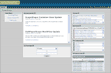
Auto-deploying framework
The system is an auto-generating framework for rapid Intranet
and Internet site deployment. This makes it ideal in situations where
IT plan to launch multiple unique sites for various departments, specialties, and purposes. The intent is to provide
a rapid deployment facility for complex web or intranet information and communication portals.
Individual SS zones are unique independent portals so that each deployment
can be tailored to the special needs of its users and their
groups.
A sales department might have discussion groups associated with pipeline reporting, sales planning, sales management oversight, promotion documentation,
conferences, and events together with a competitor pattern mapping
analyzer, for example. SS can also be used to feed in XML RSS feeds for constant, up to the minute, news events for sales people. And the
feature list goes on.
Other uses: Product development team management,
project-by-project discussion forums for team communications
and updates together with document sharing and control; Law
enforcement and private investigations for criminal
investigations; clinical patient record search and
sharing.
Most importantly the portal zones are flexible communication zones for day-to-day use. The system can be used to deploy any one zone or all depending on the flexibility need of the user. And all this is a pre-packaged launch infrastructure to simplify IT investment in managing
Intranet and Internet deployments. Existing file sharing
topologies within an organization are simply integrated
automatically in the ScapeShape framework for rapid Intranet
site deployment.
Existing information infrastructures therefore do not have to
be modified to be transformed into Intranet managed sites.
Document management systems are no longer needed as KS products
simply integrate all information assets into a search and
locating (portal) framework in which all existing information
assets are considered part of the extensive corporate document
managed infrastructure. All users can continue to use existing
forms, document styles and formats.
Screenshots of the various functions mentioned are provided while the following table summarizes options and configurations for the framework.
| ScapeShape Package Base |
# of
Sites |
2x2 Search |
Forum |
RSS
Feeds |
File
Containment |
User
Mgmt |
PS-1 |
CS-1 |
CPTY
-XM-1 |
| SS-1 |
1 |
x |
x |
x |
x |
x |
x |
x |
x |
| SS-2 |
10 |
x |
x |
x |
x |
x |
x |
x |
x |
| SS-3 |
50 |
x |
x |
x |
x |
x |
x |
x |
x |
| SS-4 |
100 |
x |
x |
x |
x |
x |
x |
x |
x |
| SS-Enterprise |
100+ |
x |
x |
x |
x |
x |
x |
x |
x |
Search zone and portal
The search portal is a zone with the PatternScape search
system embedded as an independently operating zone within the
framework. The user may deploy any PS instance within the system depending on extent of
analytic and mapping search need. Please refer to the PS product section for
details.
Communication discussion groups
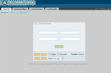
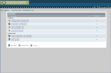
Discussion groups are highly configurable communications elements. The hierarchical visualization style displays discussions in an easy to comprehend root and branch arrangement. The user can select from a list of discussion groups (forums), open a discussion group, and view a hierarchical discussion tree of conversation threads within the discussion.
The zone provides for multiple categories, discussion groups,
and multiple hierarchical threads. Most importantly it is an
automatically deployed function and only need be configured for the user
instances (groups) for which it is assigned. And multiple
instances can be deployed automatically to simplify IT needs.
File sharing and control for uploading information assets
(the Intranet Builder)
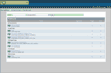
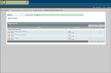
File sharing and control is a container-based file sharing sub system. Each
uploaded (Intranet) file contains a content pair, which contains
comments and file owner information about the downloadable file.
Files that are uploaded by users contain descriptions so that others may ascertain usefulness before downloading. Naturally these content description threads are indexed making all files within the system searchable assets. This is especially useful for
project management or professional information and communication web
portals where multiple file types are common.
In a clinic or law office
files can be linked
directly to the file-owner and patients and clients-securely and
privately. Network shared files are also permitted under the
container system making SS a flexible
and scalable Intranet file management framework that can
integrate well with existing file servers file types, and
forms based systems.
Common phrase co-existence terms zone
Co-existence terms are described in detail in the PS product section yet in SS
the zone is used for configuring common terms common useful for
the intended ScapeShape user group. Each SS deployment contains
facility for its own set of common terms which are powerful
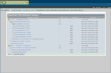
co-existence user help trees (ClusterView) for research. Therefore in a real estate deployment, the common terms listed in a tree and branch structure allow for rapid visualization of the important phrases found in the real estate specialty.
These terms and phrases can be clicked to illustrate the co-existence with other common elements allowing for
advanced search and information mining operations. In medical deployments, this would be a
Symtomatology tree which links search results with diseases
and treatments, for example. For users needing even more advanced co-x functions they can use the Co-x features embedded within PS.
RSS news feed zone
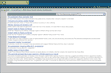
The RSS zone is an auto-generating interface to external RSS feed URL’s. Site administrators may configure subject areas and their related feeds in an easy to visualize current events zone. This is a rapid deployment RSS
capability allowing IT administrators to configure appropriate current events information
for users. Embedded in SS is reference to 4,000 RSS current event web sites for immediate deployment. Users may also enter their own URL’s.
Announcements (press type and graphic images)
The announcements zone is used for simple text based information announcements. An additional zone is also deployed allowing for 100x100 pixel graphic announcements. An option can be added to allow for search triggered commercial-grade advertisements and announcements in the graphic announcements zone. A typical application of this would be a content-based search site with forums and
advertisements or a law site selling legal services and
providing user forum counseling and forms downloading. A
publishing company might choose to sell reference material based
on their SS information and search deployment.
Top activity zones
Top discussions and top file transfers are displayed in a visually simple way for users to see what is popular viewing on the site. In the case of a marketing site, one might expect to see brochures downloaded to the sales team as one popular top file transfer while conventions and events might be a top discussion area. A
medical office
could have allergy treatment announcements, pregnancy help brochures and clinic forum discussions with professionals and
patients.
Paperless office SPS zone
The SPS zone is used for visualizing latest scanned documents and
upload activity. The user may also use the file sharing and control zone to
view scanned, sorted and collated files by various scan users. All content is searchable whether
the system contains 100 documents or 100,000,000 making the search and archival issues of current day CD scan and conversion solutions obsolete.
Noteworthy is that multiple private users may use the site for
their paperless office solution.
Voice conversion SPKS zone (the voice note)
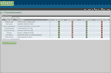
The SPKS zone is used for visualizing latest voice notes. The user may also use the file sharing and control zone to view conversions of all
voice (wav) files or listen to snippets from each. All voice content is searchable and one can read or listen to snippets that have been segmented from the source wav file to simplify search and use. The SPKS system is excellent for transcription and user archiving of huge volumes of content. Law firms, crime investigators and medical deployments are obvious, while sales rep visit reports and security officer recorded observations are also realistic on wireless hand held PDA's.
|


