 SoftPaperScape: 
An
enterprise search solution for the Green paperless operation
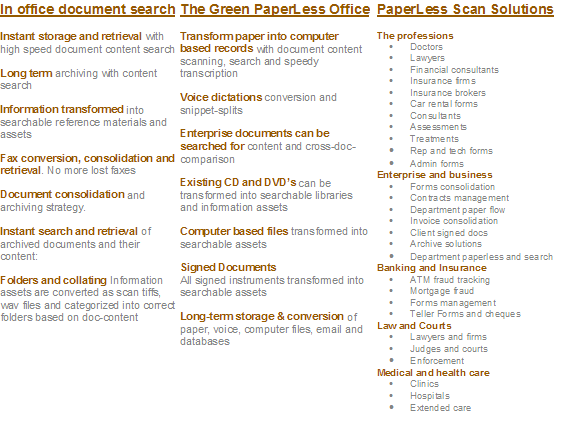
Internal document search and archiving:
Search large volumes of documents on
desktop systems, servers, intranets and Internet sites for fast
retrieval. Create document repositories for every department and
profession. No special document management systems needed-simply
install KnowledgeShape scanners, and search software and start.
Reduce cost of pulling documents from long-term storage firms:
All documents are available
by search as original scans and transcribed TXT formats. So why
incur the costs of storage retrieval. Simply scan and save.
Scanner and fax interface for rapid paper conversion and
search:
Feed
paper into scanner and walk away. The system automatically
indexes and stores documents for fast retrieval as tiff images
and transcribed text files. The search system can operate with
many millions of documents. Error correction is not required
until transcription is needed so scanning is instant.
Nevertheless auto spell checking further reduces errors.
Dictation Conversion and search:
The system converts voice dictations into
searchable transcribed documents with original voice documents
and segmented snippets.
Professional analysis and lookup (An instant retrieval vault for information,
intelligence and decision support):
The KnowledgeShape family of products maps information
regardless of record format or the servers and databases in
which it resides. No special document systems are needed for
creating the storage and search system. KnowledgeShape
transforms existing paper and voice, and hard drive based
records into searchable assets with advanced indexing and
pattern profiling search:
SoftPaperScape contains
- Browser access of HistoryView for recent
and longer term presentation of scanned documents
- The directory listing report for viewing
the stored files in their folder based infrastructure
- The Tuplet file for viewing a scanned and
dictation document with its components such as the original
scanned tiff and its text content
- Search system for finding archived documents
And it does this while conforming to privacy
and secrecy requirements within a “for your eyes only”
restricted search operation
Multiple Indicators simultaneously searched:
Users can search for multiple indicators that are in the
content of documents. And the system will analyze internal and
cross-department documentation, to find related records and
office documents
Privacy and access while searching:
The level of access and visualization
protection is turned on or off based on privacy restrictions
within the firm, cross department-sharing networks. Otherwise
records are available for viewing instantly.
Search profiling details
Pattern profiling search (PatternScape search technology):
PatternScape is a pattern profiling search
technology in which information is mapped and clustered
according to indicators, patterns, traits, markers and features
(the document fingerprint). Search results are
clustered, and are easy to navigate regardless of the complexity
and volume of documents being searched. The system solves the
issues of long-term and short-term information and document
retrieval.
The Green Paperless Office (SPS) (http://www.SoftPaperScape.com
for animation)
SPS is an paper conversion automation system that requires a network scanner
or a FAX machine and the ScapeShape Intranet file access system. The user simply selects the go
(send) button on the scanner or FAX. The rest is automated. Paper is fed into the scanner and automatically sent to a conversion repository where documents are converted and saved in the index of the search system. All scanned documents are created in a triplet structure (polytuplet) so that during search a user may click the original scanned Tiff
document, a TXT converted version, and segmentation XML
documents. The system is designed to
be an easy to use document storage and conversion system.
Interception of scanned documents for cleaning and
editing is not required as the SPS application converts,
stores, and splits the documents automatically. Automatic
spell correction ensures even higher accuracy than available
from normal OCR methods. See comments below
for details on error detection.
Please review http://www.knowledgeshape.com/corporate/brochure.html
for brochures.
SPS zone
The SPS zone is used for viewing latest scanned documents and
upload activity. The user may also use the file sharing and control zone to
view scanned, sorted, and collated files by various scan and
FAX users. All content is searchable whether
the system contains 100 documents or 100,000,000 making the search and archival issues of current day CD scan and conversion solutions obsolete.
Noteworthy is that multiple private users may use the site for
their paperless office solution. The system becomes an
extensive internal Intranet file access site for its users. Existing
network and computer based documents can be integrated into the
file sharing system automatically, making all existing files
together with uploaded paper converted documents searchable by
all content. Unlike file name searching PatternScape provides
search based on the total amount of information in existing
documents and paper conversions.

Uses
Anywhere paper archives can be converted to digital tiff format and stored and searched for quick access. Ideal for old content that contains value such as legal decisions, mining survey reports, diagnostic assessments, transactions, annual reports,
invoices and financial disclosures, insurance and banking instruments. The list goes on. The system can be used for massive back file conversion to digital or as a real time feed and search
system for day to day delivery and invoice reports for example. Simply place documents in the scanner, send to the destination folder from the panel Go button, and return to
your office and web browser, anywhere, to view
or search the results.
| SoftPaperScape |
#-IP Scanner |
Error
Correction |
Auto-Sort
& Collate |
User
Mgmt |
| SPS-1 |
1 |
|
x |
x |
| SPS-2 |
1 |
x |
x |
x |
| SPS-3 |
5 |
x |
x |
x |
| SPS-4 |
10 |
x |
x |
x |
| SPS-Enterprise |
100 |
x |
x |
x |
Handwriting conversion option for old handwritten assets
User recorded
Wav files and Tiff images of handwritten documents are integrated to facilitate
searching these documents. Search results include the original
handwritten Tiff image, a recorded transcription snippet file, and a text converted
polytuplet (content) result. The user simply scans an image, reads as
much of the handwritten document into his headset and the system
integrates the handwritten Tiff and the voice transcription for
search purposes. Pattern profiling search and conversion
technologies render hand written documents as searchable assets.
Note: any typed (form) content on a handwritten document is also
indexed to facilitate search.
Naturally the transcription process can be as brief or long
as user needs for searchable granularity. The user
interface also allows for assigning a saved-snippet to all
scanned documents within a project. Thus, snippet integration
can be auto-integrated to scanned documents thereby increasing
productivity of a batch conversion project.
Embedded in the ScapeShape framework for rapid deployment
SPS is Packaged with search, forum discussions, RSS feeds, announcements, file sharing, and controls.
This provides all users with an extensible file access Intranet
portal site, automatically.
Error correction
Error correction is performed automatically in a synonym mapping process where error words are mapped to correctly spelled words. Consequently documents are found during search even when a search term is stored incorrectly.
Errors are pre-mapped to their correctly spelled equivalent.
The conversion process also examines spelling and corrects misspelled
words for increased OCR conversion accuracy over traditional OCR
applications. This is all done without user interaction thereby
reducing the labor required to convert an operation into a green
paperless office.
Automated sorting and collating folders
All documents are saved in folders based on content of the document. This is done using the PS
content mapping process for mapping
content and creating a folder system based on the mapped
information clusters found in documents. The administrator only need create a table of reference for the system to
collate documents correctly based on content. For example, in a clinic application, doctor names would be root folders while
patients' folders would be sub-folders. Clinical assessments, billings, treatments, Rx, notes and instruction folders would propagate below the patient folder; this is all done automatically based on
the document content reference table.
This provides for automated scan-and-convert archiving with collation and folder
structuring (all this wrapped in an extensive search and Intranet access infrastructure). Regardless of the size of the
archive or
escrow project the system can save, index and search vast amounts of documents thereby providing an industrial
class alternative to DVD (CD) storage and retrieval solutions.
OCR
The OCR solution embedded in SPS has been tested against several OCR programs in the market and it was found to be a superior OCR conversion tool in two main ways: OCR accuracy,
manual free operation and batch processing stability all of
which are essential in automated paperless deployments. The
OCR application, Character eyes, by Ligature Inc is embedded in SPS.
Users of SPS are also given their extensive server based
application interface for projects in which, zone based
scanning and closer examination and repair of documents is
useful.
Scanners
The only type of scanner that can function with SPS is an IP based network scanner.
The scanner must be able to operate without interference from
post processing applications. The scanner must be able to send scans to a folder or ftp without having to pass through a pre or post processing software application. Thus the scanner
operates in an automated “press and go”
simplicity.
Existing Scanner Assets
If you own a network scanner that can send scanned documents to ftp or folders (shares) we will help validate the functionality for SPS automation. Most importantly SoftPaperScape is an automated paperless system that is configured to reduce the complexity from scanner choices.
Containers
All scanned tiff files and converted TXT files are stored in paperless folders under ScapeShape
container file sharing and control. Containers are capable of containing folders for every user or designation determined by your IT staff.
Search
Pattern profiling search for your paperless deployment with the 2x2 Search Pad provides excellent search of large paperless archives and escrow repositories. Thus SPS converts valuable paper records into searchable and retrievable information and intelligence assets. SPS can also be used in unison with SPKS for search of voice-recorded documents.
Please review http://www.knowledgeshape.com/corporate/brochure.html
for brochures.
|


